Auto retopology: why the computer can't find the elbow
Why AI 3D models from TRELLIS.2, Hunyuan3D, Tripo and Meshy are hard to turn into clean quads, how auto retopology tools like QuadriFlow comb a mesh, and the blind spot that ruins bendy bits on game characters. And why Tripo and Meshy eventually had to train new AI models to do quad topology instead of cleaning up messy meshes! :D
Welcome to part 4 of a short crash course for anyone new to 3D. If you're brand new, start with part 1, What a 3D model actually is, and take it from there. Part 2, Edge loops and quad topology, covers the basics of topology, and part 3, How to shrink a 3D model, covers how to slim down a huge mesh. In this one we look at how a computer tries to lay down good-looking topology on its own.
Let's dive in.
We've already seen why it's important to get topology right. For one, it's really pleasing to the eye. Human beings love neat repeating patterns, and nature is full of them. Image-to-3D generators, whether open models like TRELLIS.2, Hunyuan3D and Pixal3D or paid services like Tripo and Meshy, produce needlessly complex meshes. From a distance they look fine because they're so densely packed, but up close they make no sense. And we've already seen why that's impractical for a game engine like Unity, Unreal or Godot.
The holy grail is the lowest number of triangles or quads that still holds the shape of the object, while keeping everything neat and consistent. AI 3D generation is not there. Yet.
Artists call this job retopology ("retopo" for short): drawing a new, clean net of quads over a messy model. Getting a computer to do it is auto retopology, and that's what this post is about.
Everything comes out as geometry
The first and most important thing to know: every image-to-3D model turns everything into geometry. Hair, clothing, accessories, every stitch and fold in the clothing, all of it comes out as one fused shape.
Imagine a nicely ironed shirt on a model. It's smooth and flat, and when the model moves it bunches up, folds and generally deforms. Now put a picture of already-folded clothing through an image-to-3D pipeline. The folds are turned into hard geometry, and you can't smooth them out again.
An artist would do it the other way round. The mesh stays simple and smooth, and the folds, stitching and buckles are paint: the colour picture plus the normal map we met in part 3, which fakes small bumps with light. Paint is cheap and moves with the body. Geometry is expensive and stuck where it is.
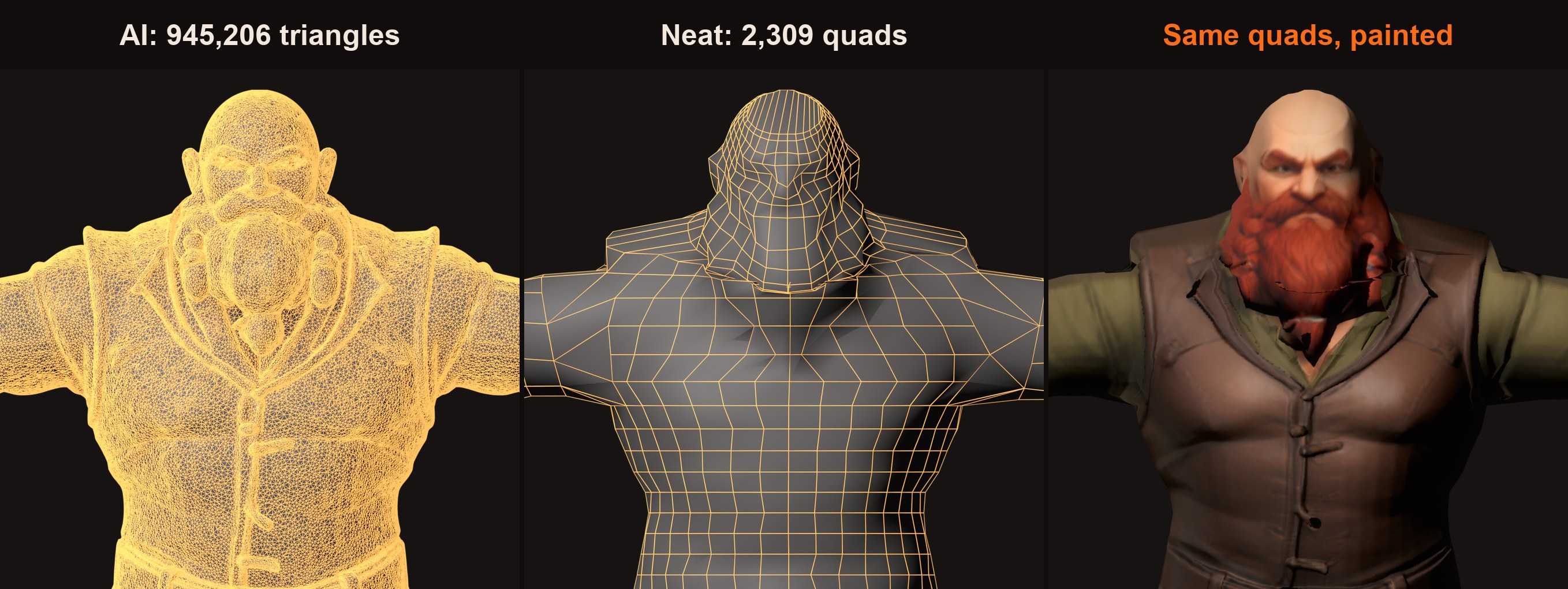
So every bit of detail is hard geometry you can't change without manual work. The moment you try to cut the triangle count on such a model, no algorithm knows which bumps matter and which are just paint that got carved in. Any reduction, simplification or remeshing ends up losing detail, or adding random detail that shouldn't be there.
So how do we solve this?
Auto retopology tools like QuadriFlow (built into Blender), Instant Meshes and the paid Quad Remesher try to do what an artist does: lay a neat grid of squares (quads) over a model. They use very clever tricks, yet they still get elbows and other bendy bits wrong. Here's why.
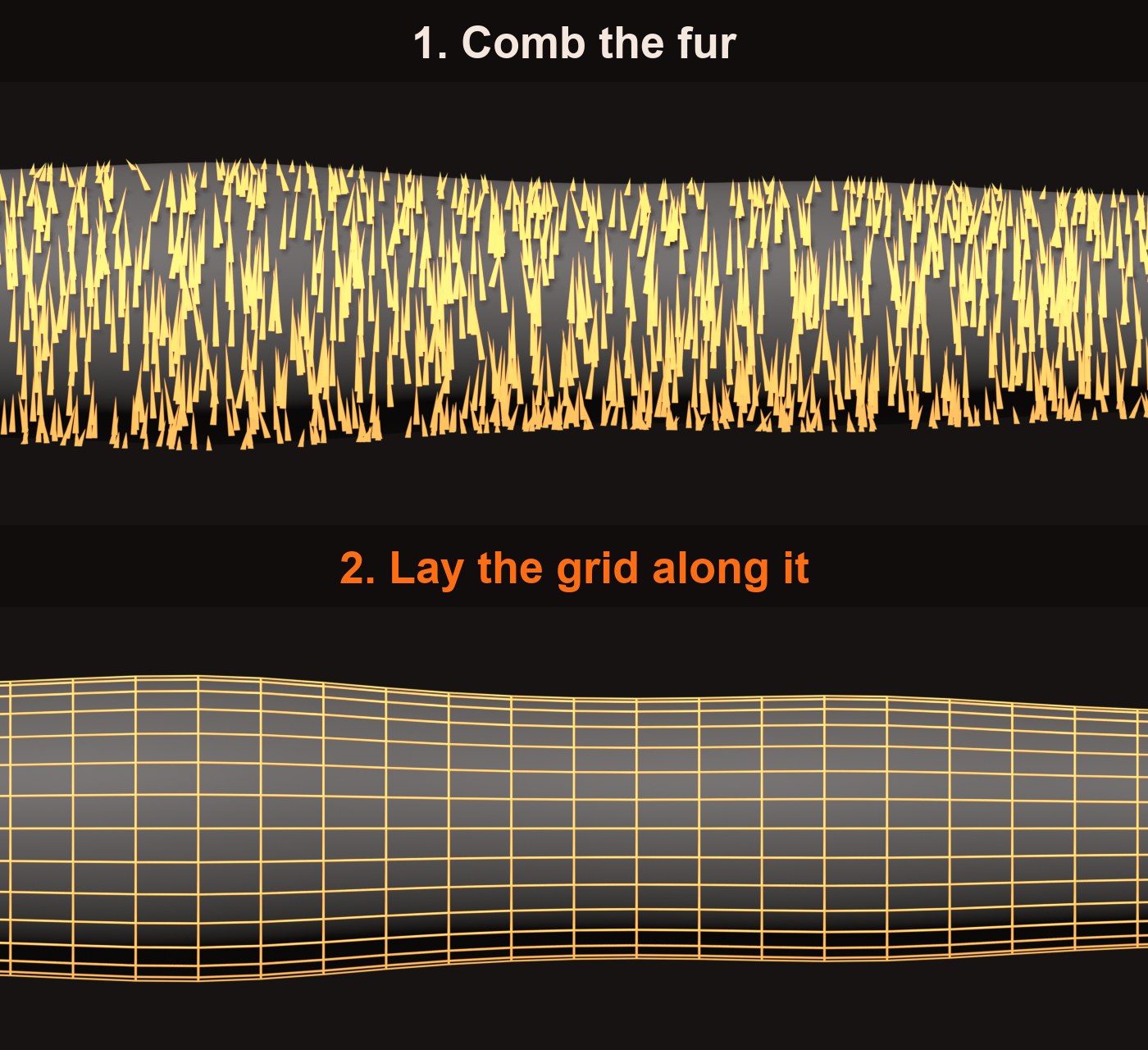
Step one: comb the fur
Imagine the model is a furry dog. The tool brushes the fur so that at every spot it points in a sensible direction. That combed pattern is called a direction field: "which way should the grid lines run here?", answered everywhere.
Once the fur lies flat, the grid is easy. Lines along the fur, lines across it, and you have quads that follow the body.
How it decides the direction
It feels how the surface curves. Run a finger around an arm: it bends a lot. Run it along the arm: nearly flat. Those two directions are the natural grain, so the tool combs along them. Sharp edges pull the comb too, like the rim of a cup.
Then it smooths the comb so neighbours agree, like brushing until no hair points against the others. That smoothing is most of the maths.
The blind spot
Curvature tells the tool where the shape bends now. It knows nothing about where the shape will bend later, when it's animated. That's what the edge loops from the previous article are all about.
Characters are usually made in an A-pose or a T-pose, arms and legs straight. To the tool, an elbow is just a straight bit of tube, no different from the forearm.
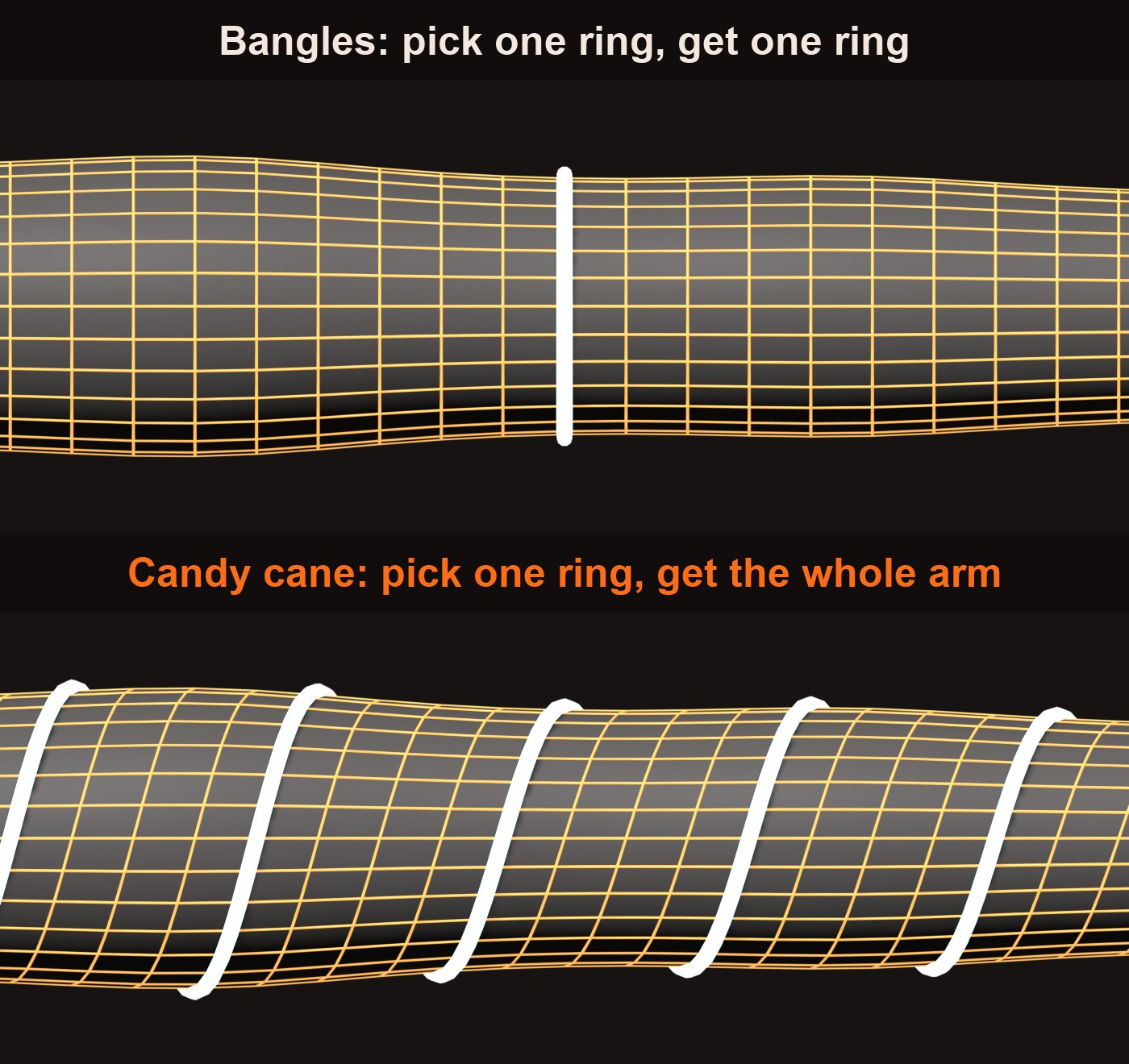
Straight tubes are actually the easy case, so the rings usually point the right way, like bangles. What goes wrong is quieter:
- No bunching. An elbow needs extra rings at the joint. The tool spaces them evenly, so it bends like a stiff hose.
- Spirals. Small bumps like sleeve wrinkles or a kneecap nudge the comb, and the rings drift into a candy-cane twist. Now try to fix the elbow by hand: an artist clicks one ring and adds more beside it. On a candy cane there is no single ring. Click one and you get a line that winds the whole arm.
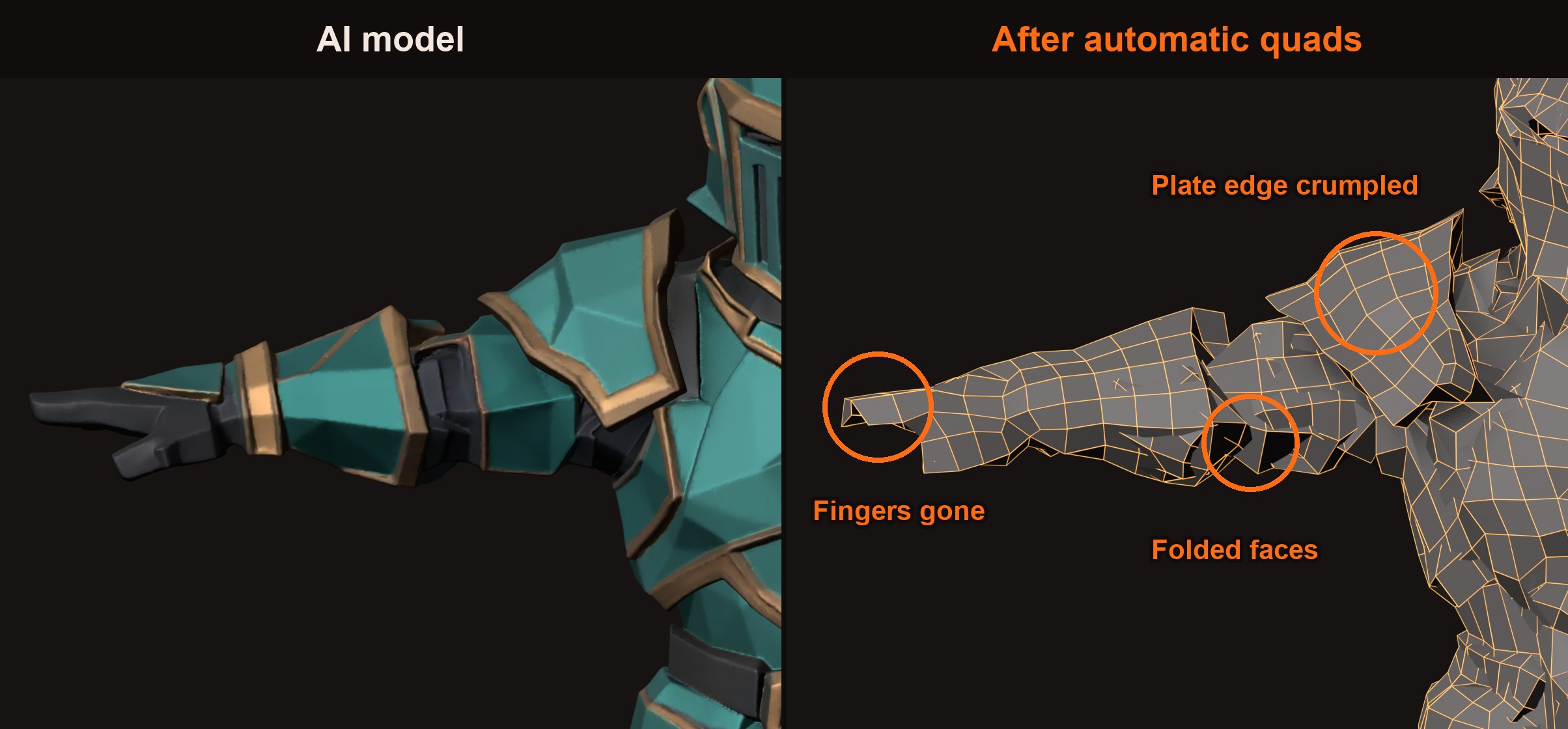
Armour makes it harder. A breastplate shouldn't bend at all; artists put the extra rings in the gaps between plates, model each plate as its own piece and paint the rivets on. But an AI-made model is one fused skin, armour melted into body (the hard geometry from earlier). The tool just sees a lumpy tube.
To be fair, the quads below are decent. The trouble is what the tool can't tell apart: a plate from a body, a finger from a hand, an edge from a fold.
The cowlick
Try combing a tennis ball's fuzz flat all over with no swirl anywhere. You can't. Maths proves it, and the proof has the best name in geometry: the hairy ball theorem. (No really, it's called that!)
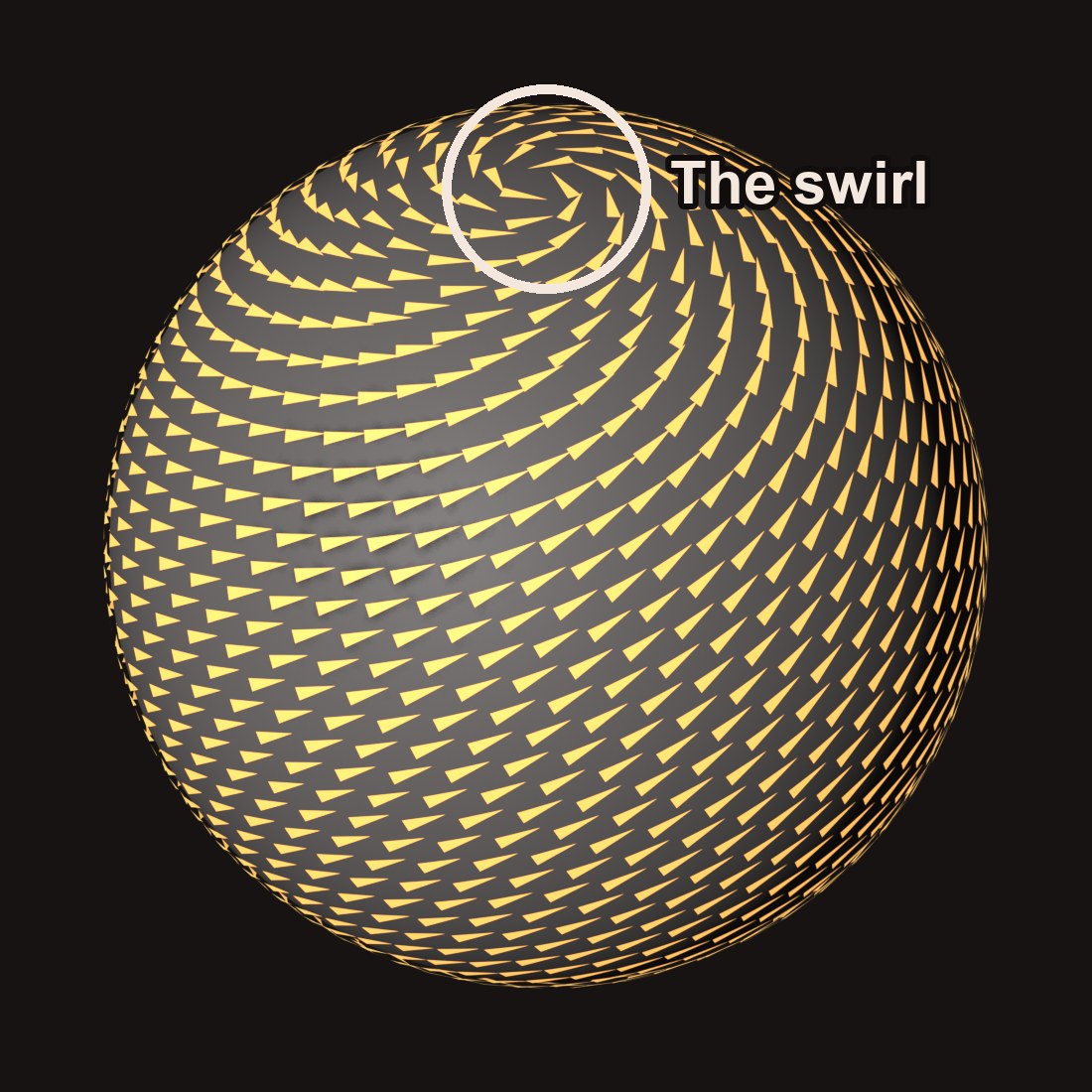
On a quad mesh, a swirl is a spot where three or five edges meet instead of four. It's called a pole. Every closed model has some, and on their own they're harmless. The catch is the same as the candy cane: a ring that runs into a pole stops being a clean ring, so you can't add an elbow loop through it. That's why artists park poles where nobody will want extra loops, like the middle of the chest. Automatic tools drop them wherever the maths lands.
The way out
We already know where the joints are. Rigging a character puts a skeleton inside it, with an elbow bone sitting exactly where the elbow is. Hand that to the remesher ("bunch the rings here, keep them straight") and the blind spot goes away. Instant Meshes even accepts drawn guide lines.
That's called guided topology, and it's a very big area of research. Tripo and Meshy have recently released their smart quad topology, but they get around all of this by using an AI trained on the way artists lay out quads by hand. There's a certain kind of joy, though, in taking a messy mesh and finding a way to clean it up. That's what we're losing sleep over, and we've made some decent progress.
Quick answers
What is auto retopology? Software that redraws a dense 3D model as a clean grid of quads, without an artist. QuadriFlow, Instant Meshes and Quad Remesher are common ones; Tripo and Meshy now offer it too.
Why is the topology from AI 3D generators so messy? Image-to-3D models like TRELLIS.2 and Hunyuan3D build the shape first and wrap it in about a million triangles, with no thought for how it will bend. Every bit of detail, from buttons to hair, is carved into the mesh.
Can QuadriFlow or Instant Meshes fix an AI-made character? Partly. They lay a grid that follows the curves, but they don't know where the joints are. Elbows and knees get evenly spaced rings, spirals or poles in the wrong place, and fused armour turns into a lump.
What is a pole in a 3D mesh? A point where three or five edges meet instead of four. Every closed model has some. They're harmless on their own, but a ring that runs into one stops being a clean ring, so artists keep them away from joints.
Does a game character need quads? Not strictly: game engines draw triangles in the end. Quads matter for how a character bends and for editing it later. Part 3 shows a low triangle count can still look good.
What's next
Part 5: What a normal is. Why some models show holes that aren't really there, what an inside-out face is, and how a flat picture (a normal map) fakes bumps. Also why thin parts like capes can vanish when you remesh them.
Part 6: Giving a model bones. What a rig is, and how "weights" decide which bit of skin follows which bone.
Part 7: Making it move. How animation works, and how games play hundreds of moving characters at once by baking the moves into a picture (VAT).
Part 8: From model to game scene. What happens when your model lands in a game engine: lights, level of detail, and why size matters.
Part 9: What we tried. All the ways we tried to make AI-made models game-sized, what each one broke, and the one that won.
After that, a new series: Open-source 3D, tested. For each step of making a game character (picture to 3D, painting, faces, rigging and moving), we try the free AI tools on our own Macs and tell you what actually works. Plus which ones you're allowed to use in a game you sell.
Want to try it yourself? AssetFurnace is free and open source on GitHub, and the step-by-step guide takes you from one picture to a rigged, animated character.
If this helped, share it with someone who's getting into 3D, or tell me what you'd like covered next on X. And if you like where AssetFurnace is going, a star on GitHub goes a long way.