AssetFurnace in context: a local path to usable 3D assets
AssetFurnace's strongest argument is that the work stays local and has no per-asset price. A prompt or image can become a textured model, a lighter game asset, and, for a humanoid, an animated GLB through one studio interface.
The main advantage is local and free
Making assets is iterative: a game developer may need several versions of a character, then a set of props, then a lighter export. AssetFurnace runs its core generation and processing steps on the user's own computer. There are no upload queues, provider keys or credits to spend on each attempt.
That freedom comes with a real setup cost. Model weights are large, Blender is needed for finishing and rigging, and the machine needs capable hardware. The project's tested routes include Apple Silicon Macs and Linux PCs with NVIDIA GPUs; Pixal3D also has a documented AMD ROCm route. The one-line installer sets up the app, while model weights are chosen and downloaded separately.
Where the pipeline earns its keep
From source art to a textured model
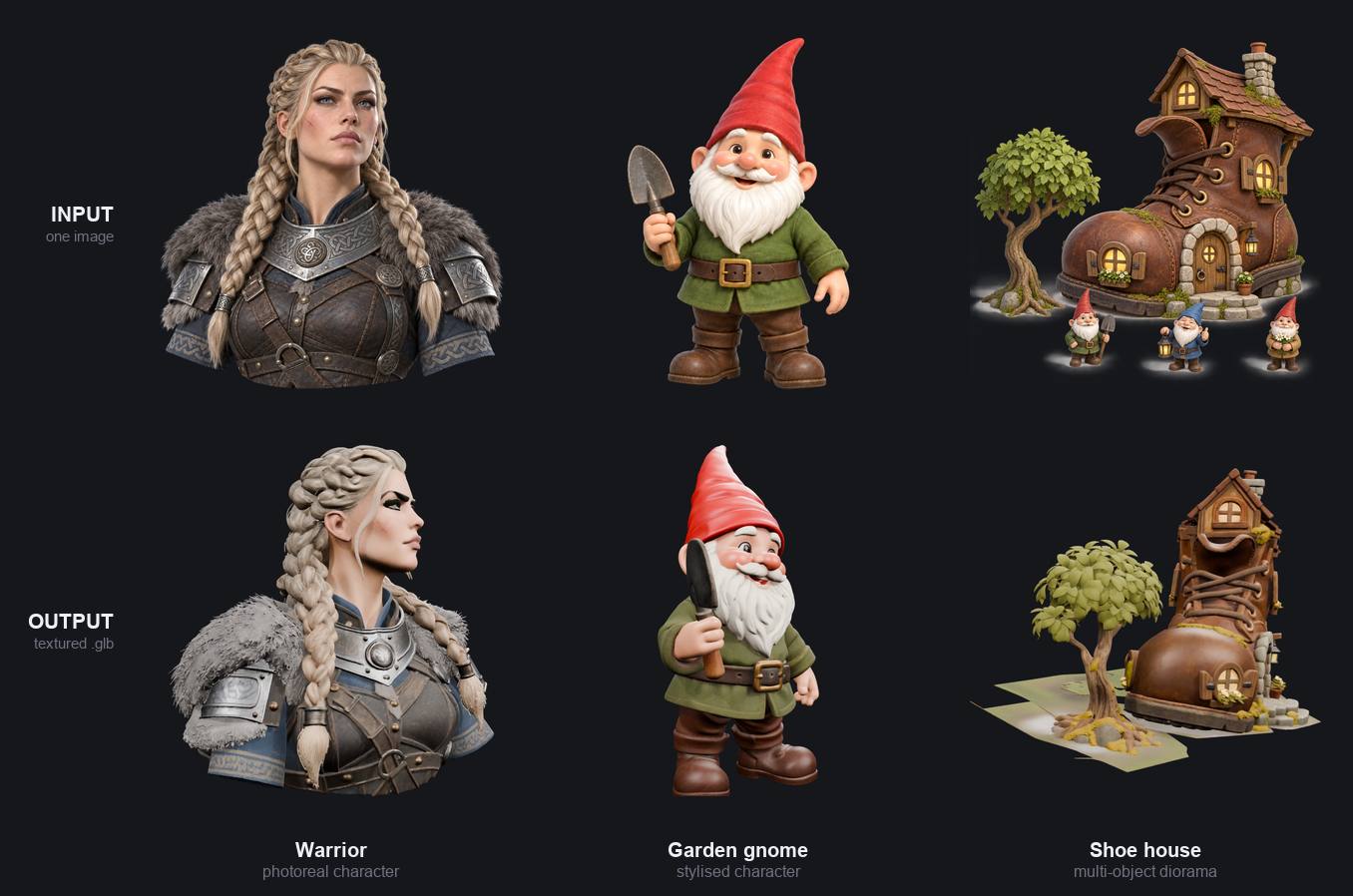
AssetFurnace accepts a prompt, a reference picture or an existing model. Its choice of 3D engines is useful because the same source art can call for different trade-offs: Pixal3D for stylised colour in one pass, TRELLIS.2 for high fidelity, or Hunyuan3D for another shape-and-paint route. The studio keeps those options behind one interface.
Finish is more than file compression
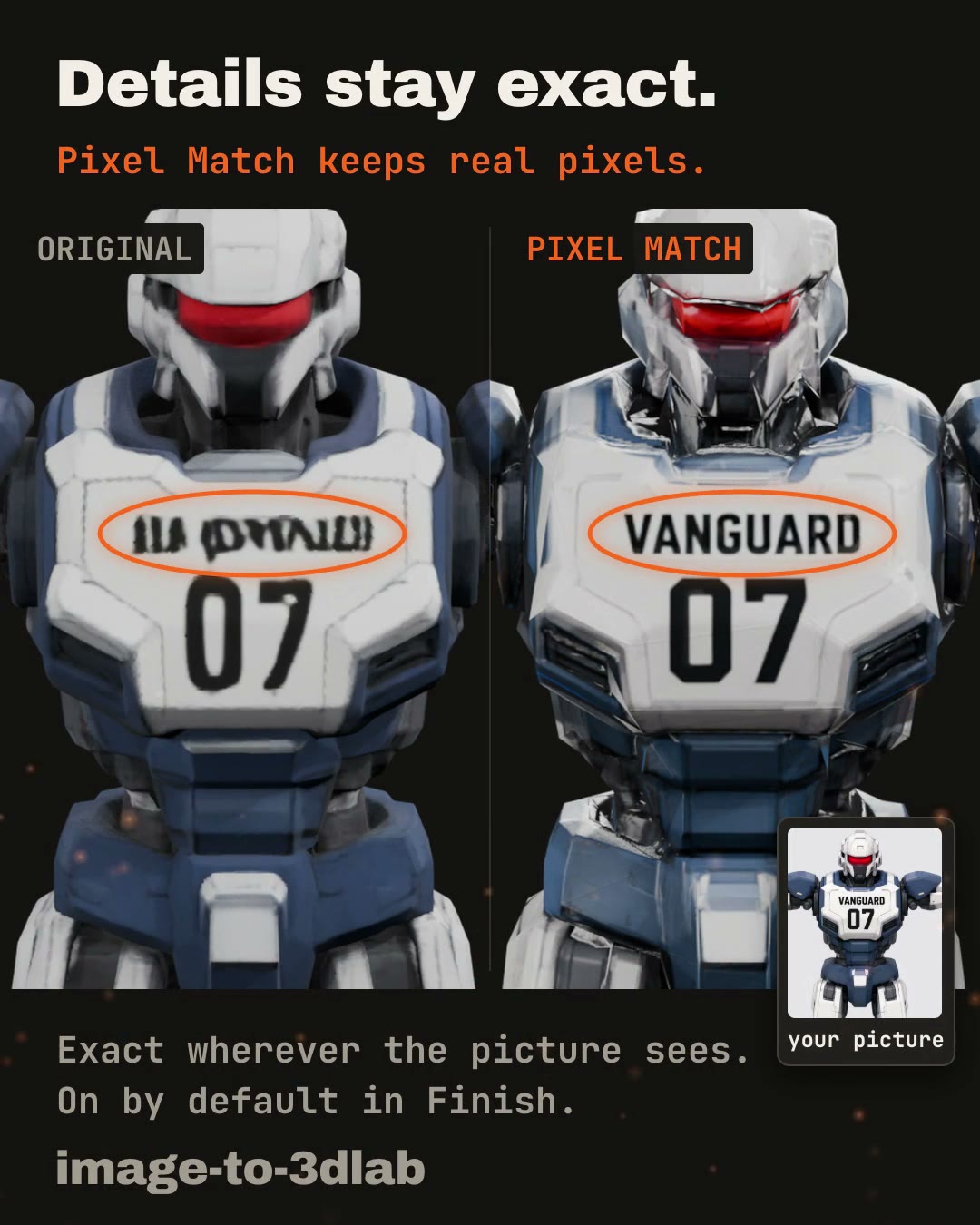
Generated meshes can be heavy or lose small visual details. Finish offers a target triangle budget and texture processing. Its Pixel Match option projects the original image's pixels onto visible surfaces of Pixal3D models, which can preserve lettering that a 3D generator redraws incorrectly. The unobserved sides still use generated texture, and Pixel Match can be switched off if a particular result looks worse.
Prop sheets help fill a scene
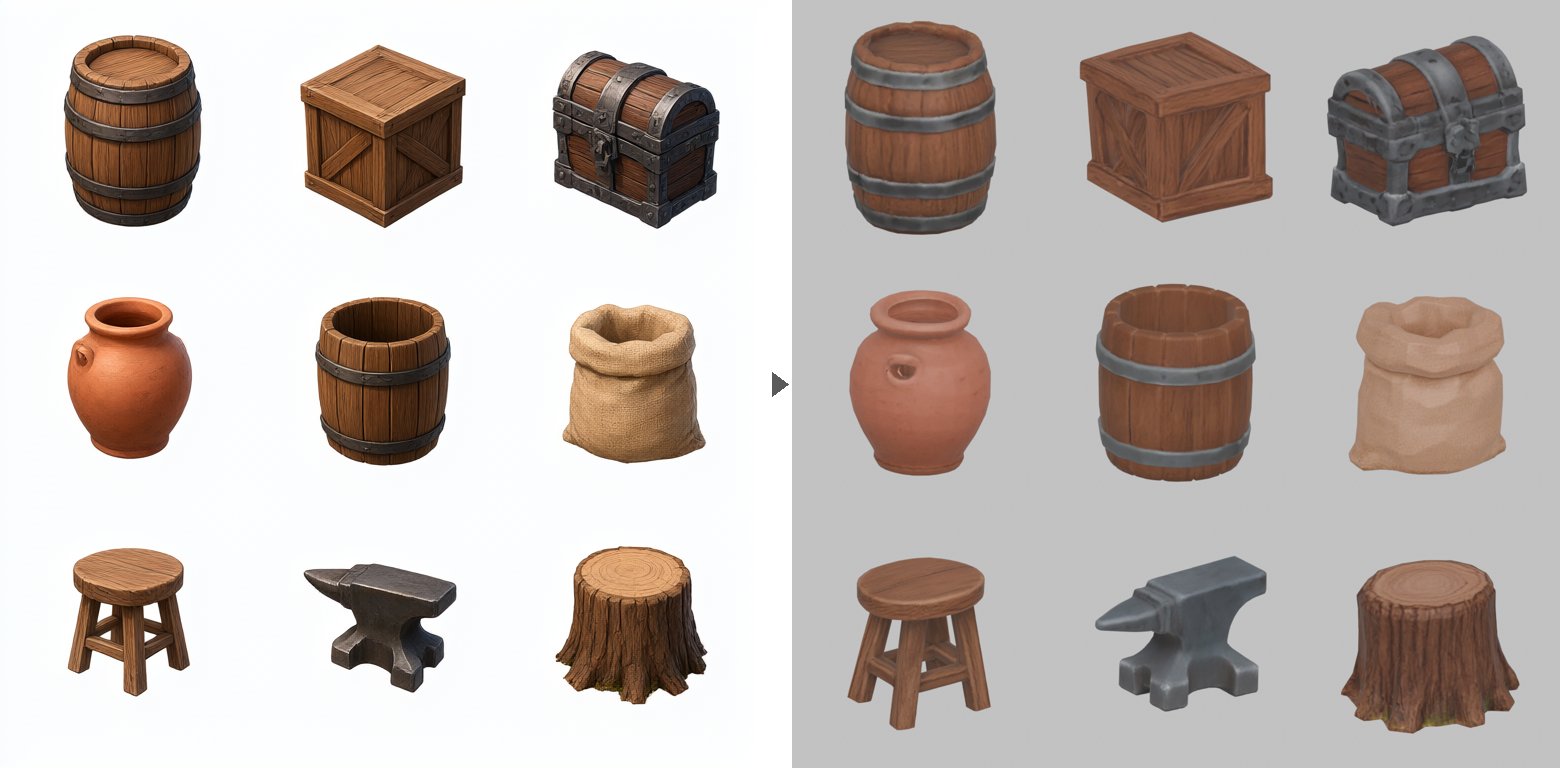
A single illustrated 3×3 sheet can become nine separate props rather than nine unrelated runs. The example below shows a coherent set of tavern objects and their 3D versions. AssetFurnace also creates levels of detail for the resulting props, a practical step for game scenes.
Rigging and motion close the loop for humanoids
SkinTokens fits a skeleton and skin weights to a humanoid mesh. AssetFurnace then retargets one of 21 bundled, pre-generated Kimodo motions and exports an animated GLB. That makes a generated character useful for prototyping movement. It does not generate a new motion from arbitrary text on each run, and the presets are for humanoids.
A connected studio matters too
The studio tracks an asset through the steps, lets a run continue after the browser tab closes, and allows a user to start from an existing picture or GLB. The same workflow has command-line entry points for automation. The value is less about any single model winning every comparison and more about avoiding the hand-offs between tools.
How adjacent projects compare
The projects below overlap with parts of the workflow, but they optimize for different outputs. AniGen is particularly interesting: its image-to-asset model generates geometry, skeleton and skinning together, including for animals and articulated objects. That unified approach is a direction AssetFurnace could learn from.
| Project | Main path | Local generation? | Best fit or limit |
|---|---|---|---|
| AssetFurnace | Prompt or image → textured 3D → finish → humanoid rig → preset animation | Yes; Apple Silicon and NVIDIA Linux, plus Pixal3D on AMD ROCm | Broad, connected asset workflow; motion presets are humanoid-only |
| AniGen | Image → mesh, skeleton and skin weights together | Yes; tested on NVIDIA Linux | Strong research route for varied articulated shapes; image-first workflow |
| Character Factory | Text → consistent rigged humanoid with facial controls and idle clip | Yes; NVIDIA | Fixed character system, especially useful for consistent avatars |
| text-to-3D-skill | Text → textured GLB → rig → idle and walk | Yes; focused on AMD Strix Halo | Complete narrow route for its target hardware |
| AnimoFlow | Text → motion fitted to a character | Yes, with model-dependent hardware | Motion creation and retargeting; mesh generation is outside its main path |
| Poseforge | Image or text → rigged character → pose and video | Core generation uses external services | Broad creative workspace that relies on provider APIs |
| ComfyUI workflows | Depends on the graph and installed nodes | Can be local | Flexible for technical users willing to assemble and maintain the chain |
Project names are intentionally unlinked. The table describes published workflows, not a head-to-head quality benchmark.
Assessment
For people who want to make many usable 3D game assets locally without paying per attempt, AssetFurnace is a strong general choice. As far as the documented alternatives here show, it connects more of the path from idea to finished and animated humanoid asset in one open-source application, particularly on Apple Silicon.
AniGen is the more interesting project for research into jointly generated rigs and non-humanoid articulation. Character Factory suits a consistent avatar system; AnimoFlow suits custom motion work. AssetFurnace's strength is the everyday path through generation, finishing, rigging and export.
These examples are from AssetFurnace's own project materials. The comparison uses each project's public documentation and should be revisited as the tools change.