How to shrink a 3D model from a million triangles to 20,000
The three ways to make a 3D model lighter, what each one breaks, and how baking gets the detail back.
This is part 3 of a short crash course for anyone new to 3D. In part 1, What a 3D model actually is, we saw that a 3D model is a hollow net of triangles, and that AI generators hand you about a million of them. In part 2, Edge loops and quad topology, we saw why the way those triangles join up matters the moment a character moves.
If you're new to 3D, I strongly recommend reading those two first. This one will make a lot more sense.
This one is about having our cake and eating it: getting from a million triangles down to a game-sized 20,000, and still ending up with a model that looks good.
With that, let's jump in!
Three ways to make a model lighter
| Route | The idea | Examples |
|---|---|---|
| Simplify | Keep the net, remove points | Blender Decimate, meshoptimizer |
| Remesh | Throw the net away, weave a new one | Voxel Remesh, QuadriFlow, Instant Meshes |
| Retopo by hand | An artist draws a new net on top | Maya Quad Draw, RetopoFlow |
Simplify: squeeze two points into one
In part 2 we saw that artists build with quads. The graphics card splits every quad into two triangles before it draws anything, so triangles are what we count, and triangles are what we shrink.
To simplify, pick an edge and squeeze its two end points into a single point. The two triangles that shared that edge disappear. Repeat until you hit your target, say 20,000 triangles.
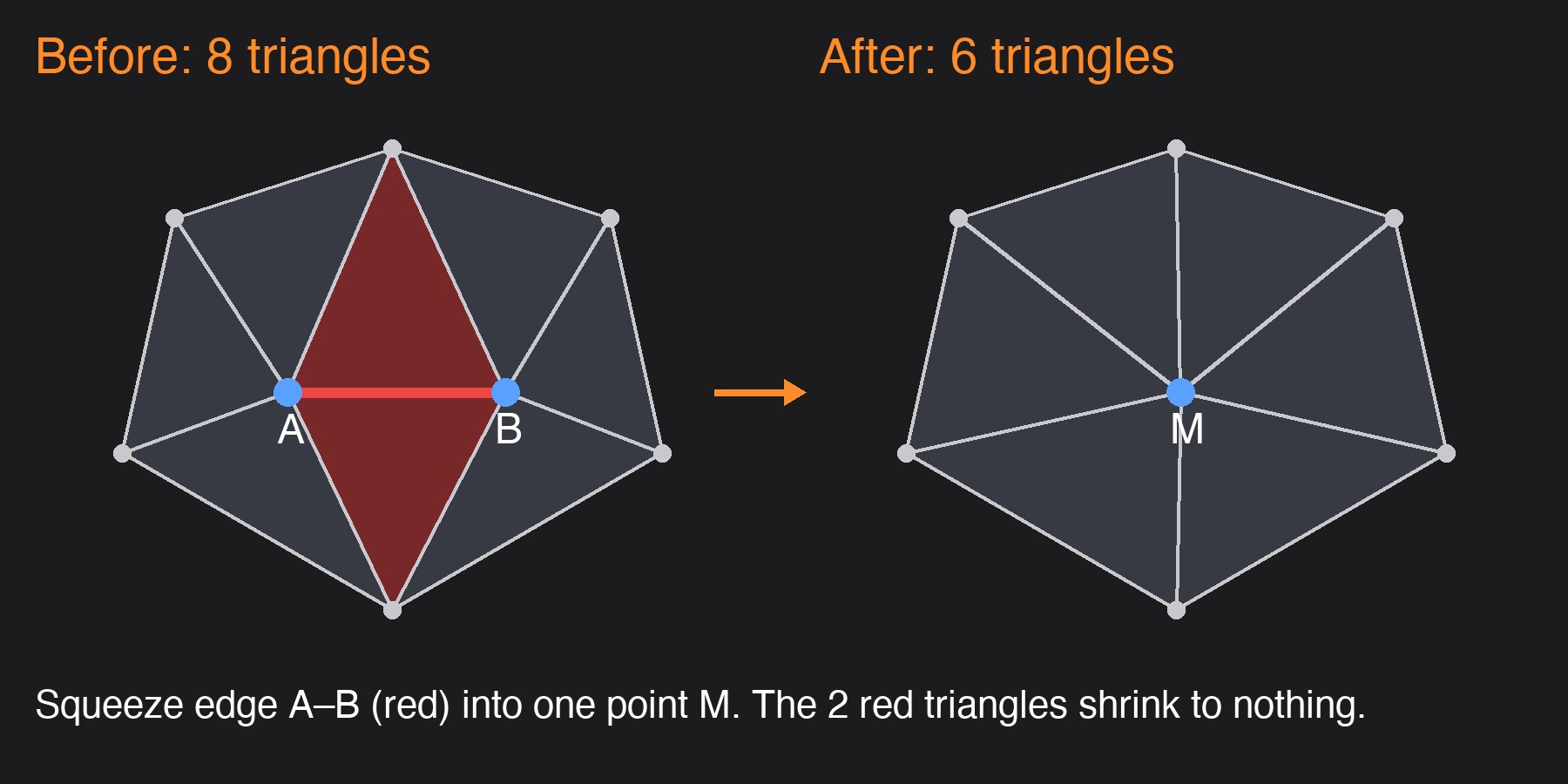
The clever part is which edge to squeeze first. The standard method, called QEM (from a 1997 paper by Garland and Heckbert), scores every edge by how much squeezing it would change the shape.
- On a flat stretch, merging two points changes nothing. Score zero, squeeze freely.
- On a sharp peak, merging would slice the tip off. Big score, leave it alone.
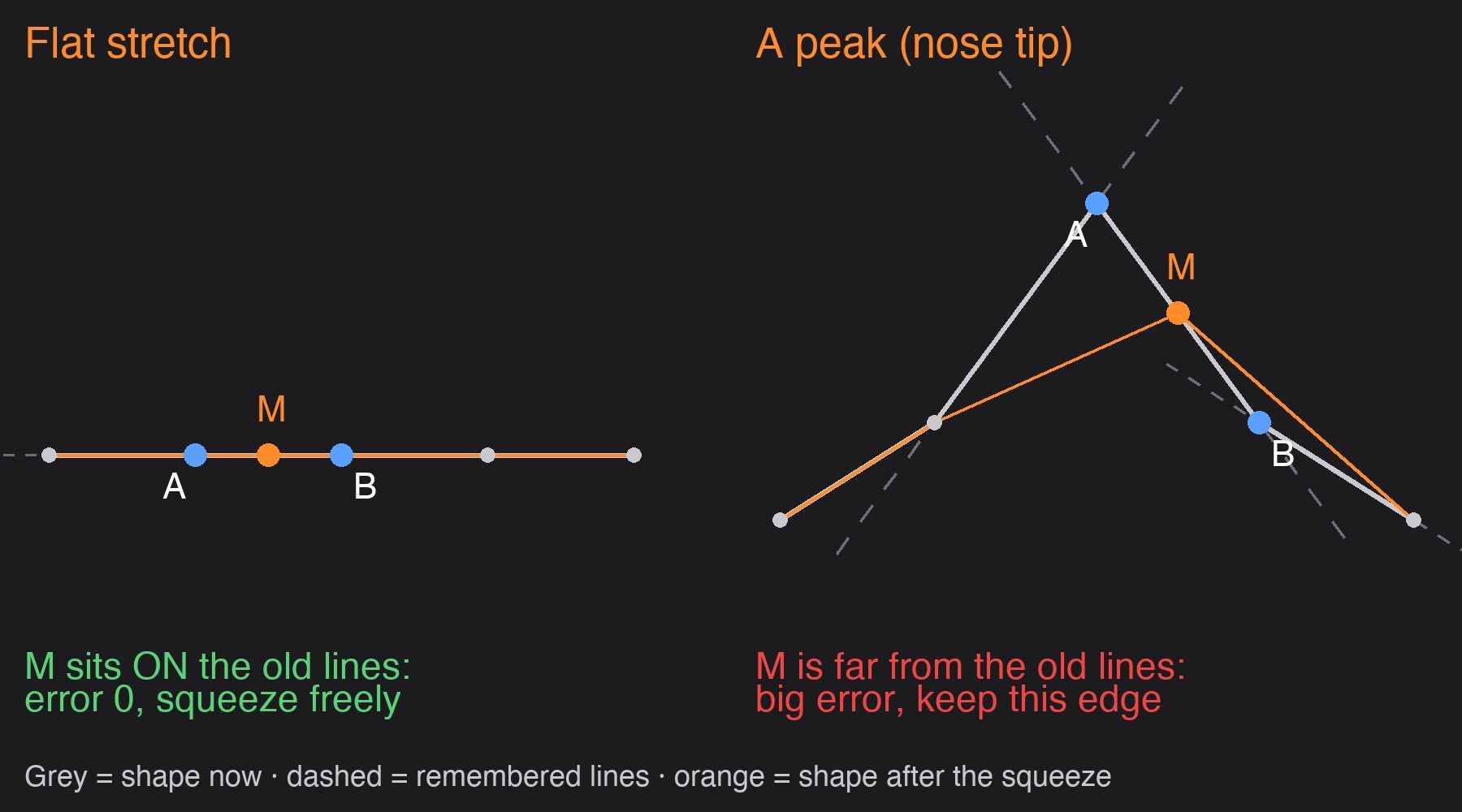
It always compares against the original shape, never the half-shrunk one, so small errors don't pile up.
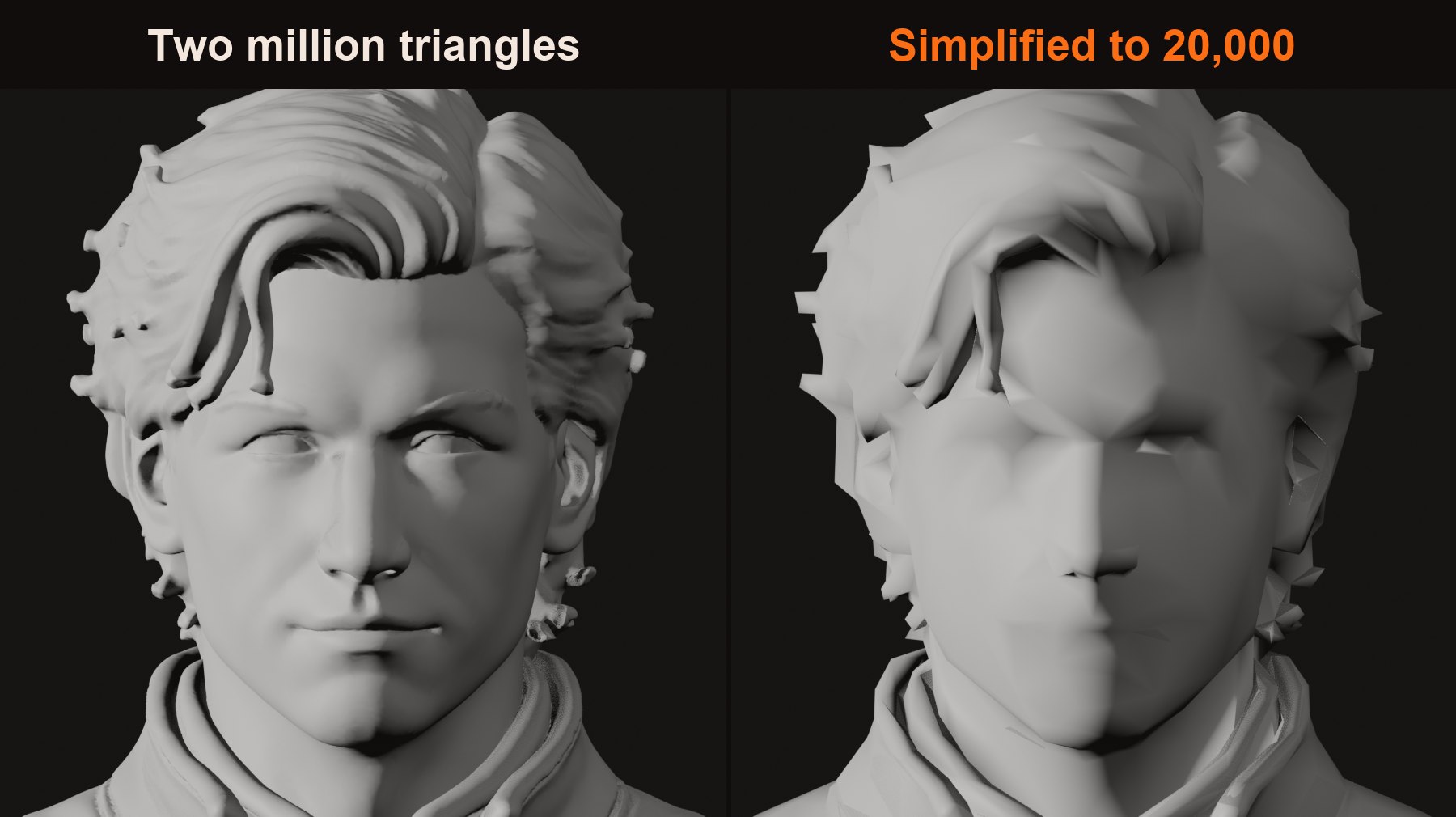
What it breaks: fine, shallow detail. Carved eyes and lips are tiny dents on a big body, so to the maths they're the cheapest thing to flatten, and they go first. It's like shortening an essay by cutting the shortest sentences, which turn out to be the punchlines.
We hit this one ourselves: shrink a character to 20,000 and the eyes go first. That's why AssetFurnace paints faces straight from the original picture, and why Hero face rebuilds the head on its own.
Remesh: rebuild it out of blocks
Remeshing throws the old net away and weaves a new one. There are fancy remeshers that try to lay down a neat artist-style grid of quads (QuadriFlow, Instant Meshes). They get a whole post of their own next time. Here's the simplest one.
Voxel remesh works a lot like Minecraft. It fills the model with tiny blocks (voxels), keeps the ones that are inside, and wraps a smooth new skin around them.
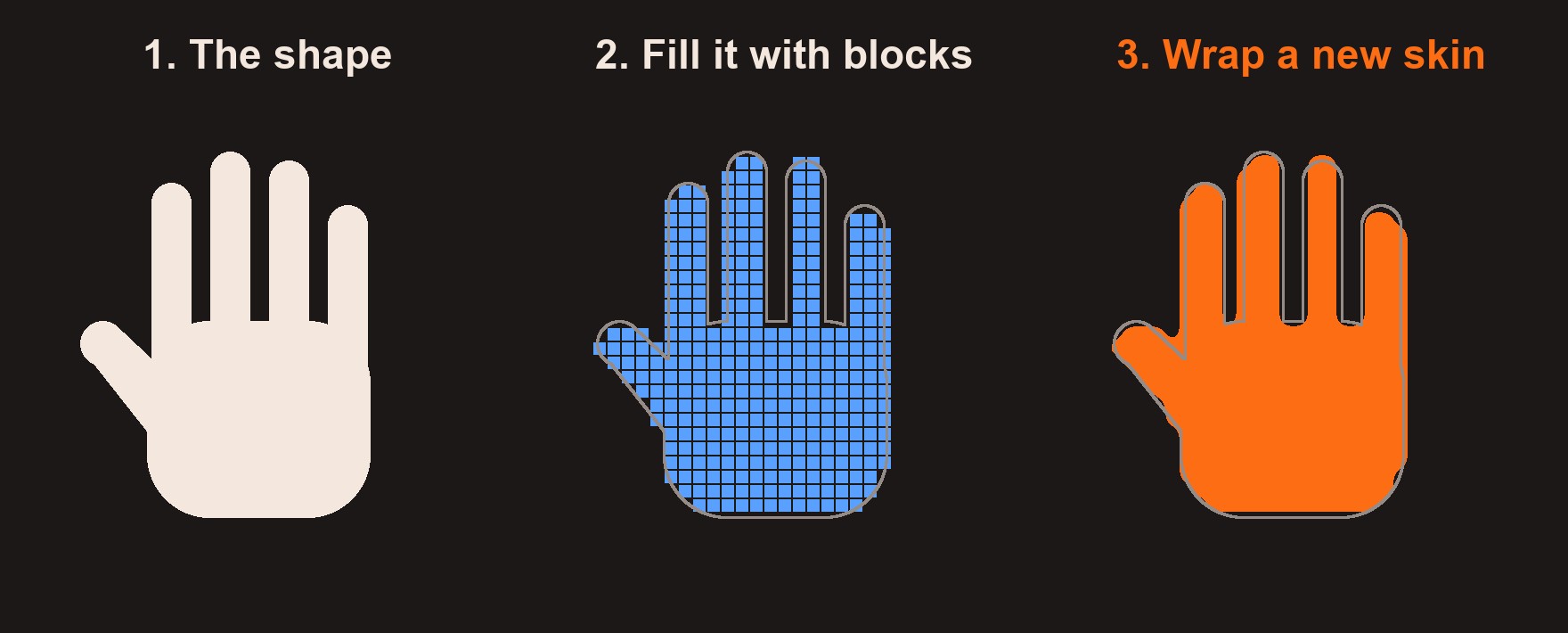
The skin-wrapping step has a name: marching cubes. And you've already met it.
Remember part 1, where AI generators slice their models out of a fine 3D grid? This is that. The AI never draws triangles itself. It imagines the shape as a giant block of tiny blocks, hundreds along each side, and decides for every one: inside or outside? Then marching cubes wraps the skin, exactly like the hand above, just in 3D and with far smaller blocks.
That's where the million triangles come from. Every block the surface passes through gets a couple of triangles, whether that bit is a plain flat back or a detailed eye. Nothing decides where detail matters, so every triangle comes out the same size.
See how it works: open the marching cubes playground →
What it's good at: the new skin is sealed. Holes close, overlaps fuse.
What it breaks: the blocks never actually know the shape. All they know is which corners are inside and which are outside. The skin in between is a guess.
With lots of tiny blocks, the guesses sit so close together that they look like a smooth curve, and you'd never notice. With a few big blocks, the guessing shows. Try building a curvy flower vase out of 20 big cubes: it's never going to cut it.
That's the trap. Tiny blocks hide the guessing but blow your triangle budget. Big blocks fit the budget but melt the fingers.
It also only works if the computer can tell inside from outside. A model with a hole in it is like a burst balloon: the inside leaks out, and there's no telling which side is which. Super thin parts, like a cape or a sheet of paper, are trouble too. There's barely any inside for a block to land in, so no corners count as inside, no triangles get laid down, and the whole part just vanishes. Why some parts of a model have no inside at all is a rabbit hole worthy of its own post, and we'll get to it.
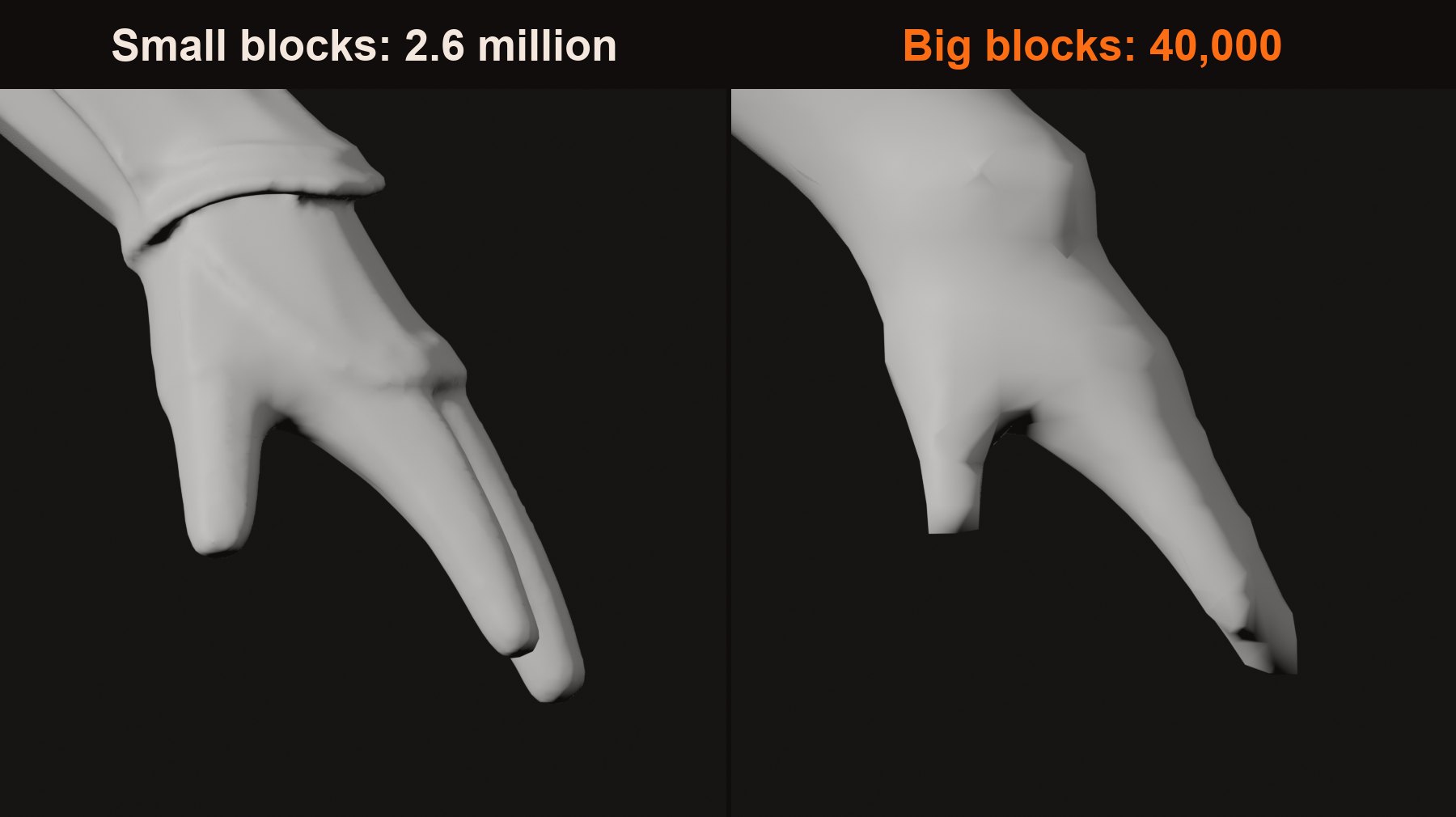
So voxel remesh is a cleaner, not a finisher. That's why it's often paired with simplify: clean first, then shrink.
Retopo by hand: an artist draws a new net
The gold standard. An artist traces a brand new net over the heavy model, like tracing paper over a drawing, and every point they place snaps onto the surface underneath. Rings go where things bend (part 2's edge loops), big quads go where nothing happens, and the triangle count ends up wherever the artist wants it.
The catch is time. It's skilled, slow work, hours to days for a character. Automating it is exactly what Tripo's and Meshy's smart topology features are chasing, and it's what the next post is about.
Why not just use smooth curves?
Maths has perfectly smooth curves, and car designers use them all the time. Two catches:
- The graphics card only draws triangles, so curves get chopped into triangles anyway.
- The computer never has the real shape, only its inside/outside tests. A curve guesses "it's smooth", which is right for a ball and wrong for a box, whose corners get rounded off.
Getting the detail back: baking
Now for the cake. Every route above throws away small detail: wrinkles, stitching, the carved edge of an eyelid. But we still have the million-triangle original sitting right there. So we copy the detail off it, into a special picture called a normal map.
A normal map tells the light which way every tiny bit of the surface faces. The game then lights the low model as if the dents and carving were still there. Copying that detail off the original is called baking.
It's one of the oldest tricks in game art. Pretty much every game character you've ever played uses one.
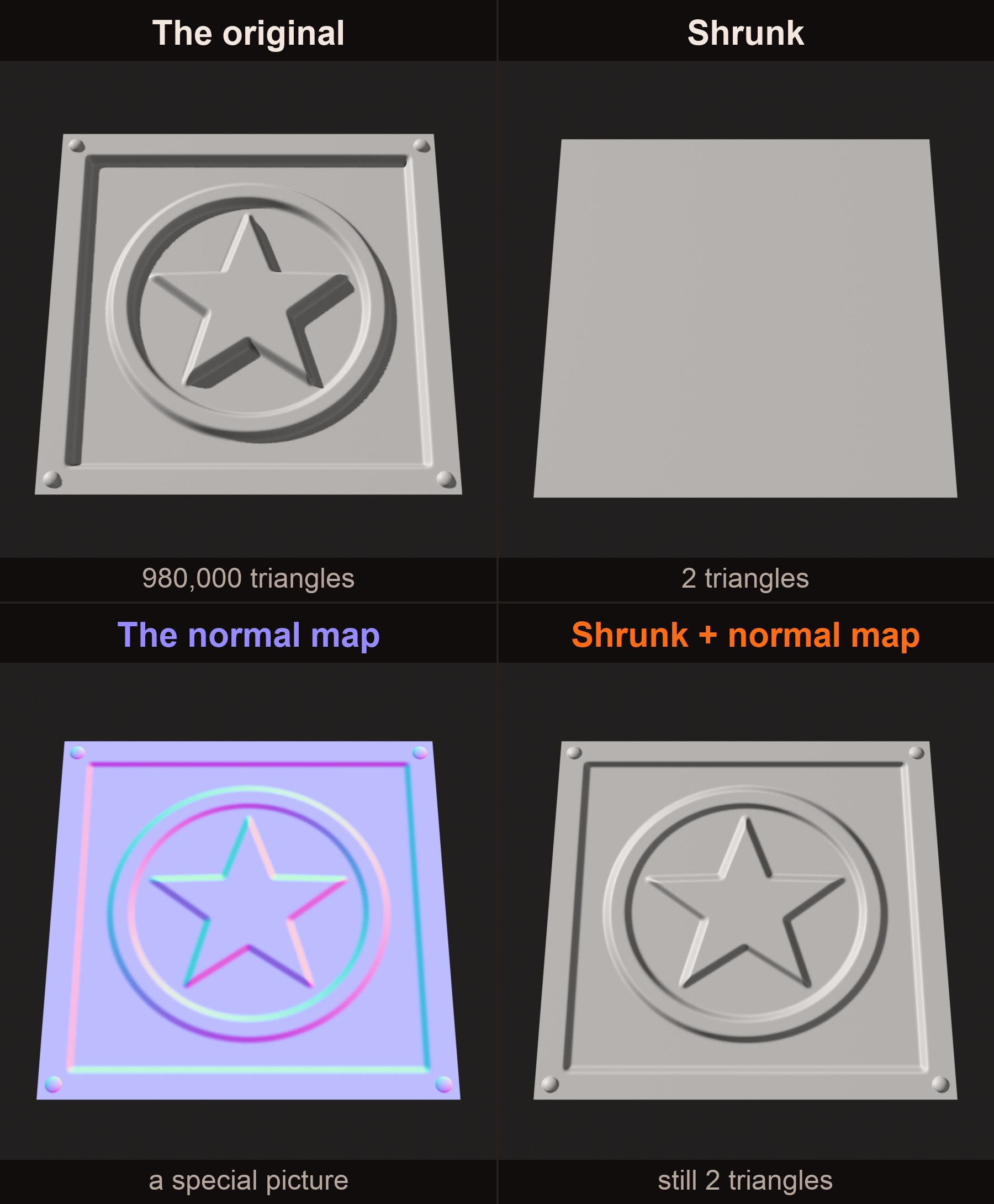
What it can't do: it fakes the light, not the shape. Look at the outline and you still see the low model, so a nose tip that got sliced off stays sliced when you see it from the side.
What a normal actually is, and how that purple picture works, gets a post of its own soon.
How low should you go?
There's no single magic number. It depends on what the model is for and where it shows up. Rough guides:
- Background props (crates, rocks, chairs): a few hundred to about 2,000 triangles.
- Mobile game characters: about 5,000 to 15,000.
- PC and console hero characters: about 50,000 to 150,000, sometimes more.
Games also cheat with distance. A model usually ships as several versions, each lighter than the last, and the game swaps in a lighter one as it moves further from the camera. You'd never see the difference from across the map. These are called LODs (levels of detail).
In AssetFurnace, Finish's main choices are 10,000, 20,000 (the default) and 40,000 triangles. In our tests 10,000 and 20,000 looked as good as 40,000, sometimes better, while 5,000 started breaking shapes. Props cut from a prop sheet get their lighter far-away versions made for you.
Back to the gator
Remember the gator from part 1? Here it is again.
That's 98% of the triangles gone, and from a normal viewing distance it still looks like the same gator.
But look at the mesh lines on the right. Long thin slivers, triangles going every which way. Part 2 would call that a mess, and it is. Simplifying keeps the shape, not the flow.
And no, it's not because it's triangles. Here's a tidy mesh laid out in quads, the same mesh split into triangles, and a mesh that was simplified:
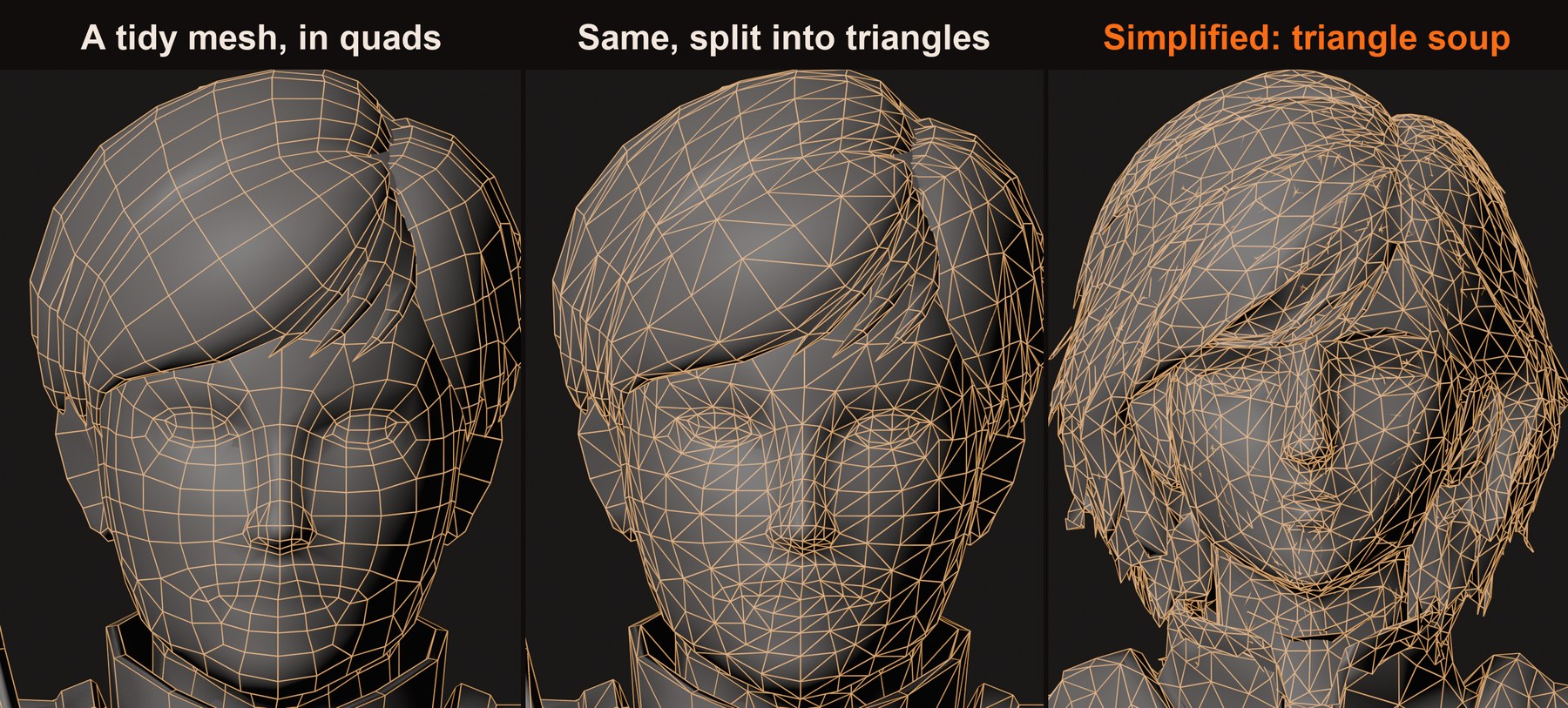
The flow survives the split. Simplifying never had any to begin with. That's fine for a statue, a rock or a prop that never bends. For a character that has to wave an arm, it isn't enough yet.
To sum up
- Simplify keeps the net and removes points. It holds the big shape and eats the small detail.
- Remesh throws the net away and weaves a new one. It seals holes, but the simple version ignores the shape.
- Retopo by hand is the gold standard, and slow.
- Baking copies the lost detail into a normal map, so the light still sees it.
What's next
Part 4: Why the computer can't find the elbow. The remeshers that try to lay down an artist-style grid of quads, how they decide which way the lines run, and the blind spot that ruins elbows.
Want to try it yourself? AssetFurnace is free and open source on GitHub, and the step-by-step guide takes you from one picture to a rigged, animated character.
If this helped, share it with someone who's getting into 3D, or tell me what you'd like covered next on X. And if you like where AssetFurnace is going, a star on GitHub goes a long way.